
Pure Tidings
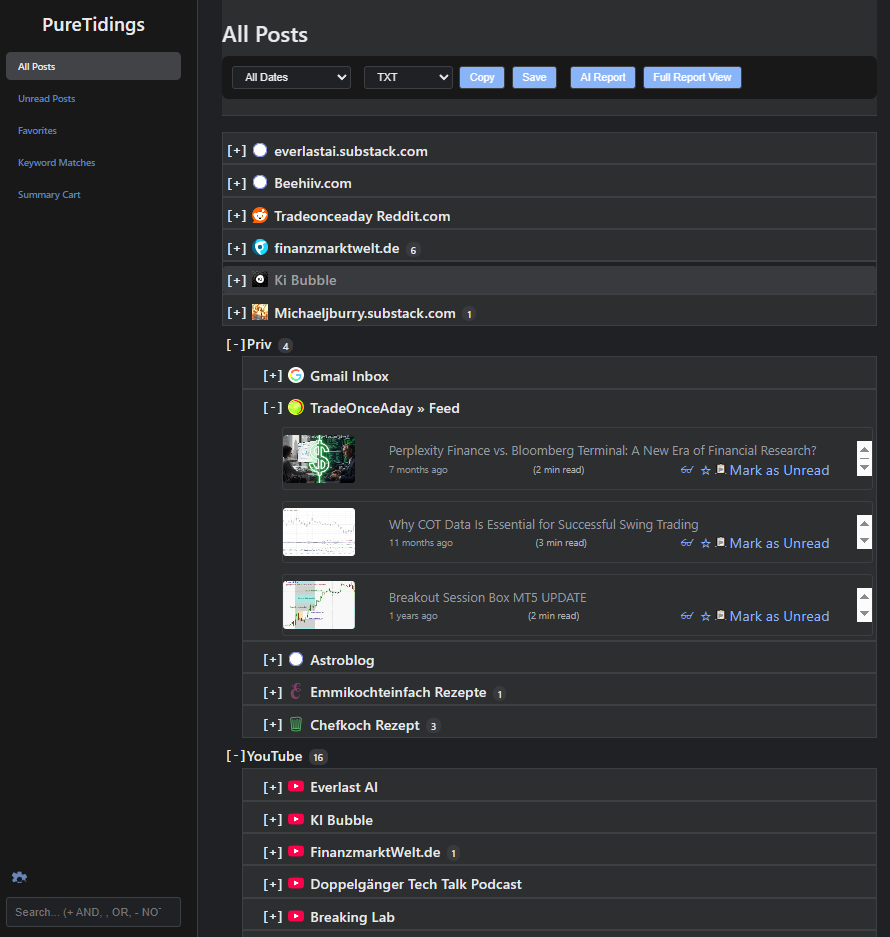
Pure Tidings is a modern, 100% vibecoded, standalone desktop application built with Tauri v2 and Rust that brings a private, AI-powered news and intelligence workstation directly to your desktop. Designed for power users, researchers, and creators, it seamlessly aggregates RSS/Atom feeds, full-text web articles, YouTube video transcripts, and direct IMAP email newsletters into a unified, distraction-free reader.
By operating completely native and client-side, Pure Tidings ensures your reading habits, subscription lists, and email credentials remain 100% private. Enjoy zero monthly subscription fees, native desktop performance with zero CORS restrictions, bidirectional email read synchronization, local keyword automation, advanced Boolean search, and intelligent summarization using your own Google Gemini API key (BYOK).
Highlights:
- Multi-Platform Native Power & Zero CORS: Built with Tauri v2 and Rust for Windows, macOS, Linux, and Android. Fetches feeds, full-text articles, and YouTube transcripts directly via native Rust networking without cloud proxies, middleman servers, or CDN IP bans.
- Universal IMAP Email & Newsletter Hub: Connects directly to any IMAP inbox via secure Rust TLS (
imap,mail-parser). Ingest newsletters (Substack, Morning Brew, financial digests) alongside your RSS feeds with bidirectional read status synchronization (\Seen) and zero third-party cloud forwarding. - High-Fidelity Sandboxed Email Viewer: Newsletters render in an isolated sandboxed iframe with anti-hotlink CDN image protection (
no-referrer), an instant Light/Dark mode toggle ([☀️ Light / 🌙 Dark]), and clean Markdown/HTML/TXT export without raw CSS leakage. - 100% Local & Private (Unlimited IndexedDB Engine): No user accounts, tracking analytics, or cloud databases. Backed by a high-capacity IndexedDB engine that eliminates browser storage quotas, keeping all feeds, email credentials, archives, and API keys strictly on your device.
- Zero-Subscription AI (BYOK) with Direct Storage Saving: Instant article breakdowns, YouTube video TL;DW summaries, and customizable system prompts powered directly by your own Google Gemini API key. Summaries and articles save directly to your device’s filesystem (
/storage/emulated/0/Download/on Android, Downloads folder on Desktop) via native Rust IPC (save_download_file), with Share sheet fallback. - External Browser & Native System Notifications: Seamlessly launches article links in your system default browser on desktop and mobile (
tauri-plugin-opener), accompanied by native system notifications on Windows, macOS, Linux, and Android (tauri-plugin-notification). - Touch-Enabled Draggable & Resizable Workstation: Free-floating Reader and Settings dialogs with smooth single-finger header dragging, 44x44px touch corner handles (
◢), dedicated right-edge width drag handles, 1-tap Fit/Maximize toggle (⛶), and dynamic landscape viewport auto-clamping. - Touch-Friendly Feed & Folder Hierarchy Management: Reorder feeds and folders effortlessly on touchscreens and mobile with 1-tap Up/Down (▲/▼) buttons and nest or re-parent folders via dropdown selection with automatic cycle detection.
- Native Multi-Language (i18n): Seamless live interface switching between English, German, Spanish, and French with immediate runtime UI translation.
- Nextcloud & WebDAV Cross-Device Cloud Sync: Seamlessly synchronize your feeds, read articles, favorites, and settings across your desktop and mobile devices via Nextcloud, ownCloud, MagentaCloud, or any WebDAV server with mathematical Last-Write-Wins (LWW) dual-map conflict resolution and zero cloud middleman.
- Mobile-Optimized & Cross-Platform Backups: Features safe-area status bar protection, direct clipboard backup restore on Android, and scheduled daily backups (OPML 2.0 & JSON) to a local folder of your choice on desktop.
PureTidings Desktop — The Privacy-First, Native AI Feed & Newsletter Reader
Introduction
In an age of information overload, algorithmic manipulation, and subscription fatigue, PureTidings Desktop completely redefines how you consume news, technical articles, and media feeds.
Today, valuable content is fragmented across RSS channels, YouTube technical streams, and email newsletters (such as Substack, Morning Brew, or specialized industry digests). Most modern aggregators have pivoted into expensive SaaS platforms, charging anywhere from $10 to $30 every month just to sync feeds through third-party servers, forward private emails through external webhooks, and run metered AI summaries. They track your reading behavior, store your inbox credentials in cloud databases, and break newsletter layouts in dark mode.
PureTidings Desktop takes the opposite approach: a local-first, native desktop application built with Tauri v2 and Rust. It eliminates the middleman, connects directly to your feeds and email accounts from your own machine, and puts complete control of your data, subscriptions, and AI capabilities back where it belongs: on your personal computer.
By combining native desktop networking with a Bring Your Own Key (BYOK) model for Google Gemini AI, PureTidings delivers an ultra-fast, clutter-free news intelligence workstation with zero recurring subscription fees and complete privacy.
Key Capabilities
📬 Universal Native IMAP Email & Newsletter Hub
- Direct, Serverless Inbox Sync: Connect directly to any standard IMAP email account (Gmail, Yahoo, Fastmail, ProtonBridge, iCloud, or custom corporate domains) using secure native Rust TLS (
imap,native-tls,mail-parser). - Consolidated Reading Flow: Substack newsletters, financial roundups, and developer digests automatically appear inside your feed hierarchy under a dedicated
📬 Email Inboxesfolder alongside standard RSS and Atom channels. - Bidirectional Read Synchronization: Mark an email as read or unread in PureTidings, and the
\Seenflag is automatically synchronized back to your mail server in the background. Ingestion uses non-intrusiveBODY.PEEK[]fetching to prevent unread emails from prematurely changing status in external mail clients. - Zero Third-Party Cloud Relays: Your email address, app passwords, and inbox contents never touch an intermediary cloud server or proxy. All authentication and TLS handshakes execute straight from your desktop.
🖼️ High-Fidelity Sandboxed Email Viewer & Anti-Hotlink Protection
- Isolated Sandboxed Canvas: Email newsletters render inside an isolated
<iframe>canvas that preserves complex multi-column layouts, nested tables, avatars, sponsor badges, and stylized buttons without visual distortion. - Anti-Hotlinking CDN Image Bypass: Eliminates broken newsletter images and
403 Forbiddenerrors by injecting<meta name="referrer" content="no-referrer">, allowing anti-hotlinked images from CDNs (SendGrid, Mailchimp, Substack, AWS) to load smoothly. - Instant Light/Dark Theme Switcher: Reading rich emails in dark mode often leads to illegible black text on dark backgrounds. PureTidings includes a dedicated toolbar toggle (
[☀️ Light / 🌙 Dark]), letting you inspect newsletters in their pristine white canvas or toggle inverted dark styling with a single click. - Pristine Multi-Format Export: Copy or save emails and articles to Markdown (
.md), HTML (.html), or Plain Text (.txt) with intelligent DOM sanitization that strips all<style>and<script>blocks without leaking raw CSS into your notes.
🧠 Zero-Subscription AI Intelligence (BYOK)
- On-Demand Article & Newsletter Summaries: Generate instant, high-quality bullet points, executive briefings, and analytical takeaways for any article or email newsletter with a single click.
- YouTube Video Summaries (TL;DW): Don’t have time to watch a 45-minute technical talk or market analysis? PureTidings automatically extracts multi-language transcripts via InnerTube and produces structured video digests directly inside your feed.
- Custom System Prompt Engineering: Tailor the AI output to your specific needs. Whether you require German/English translations, key financial metric extraction, action items, or Markdown tables, you can define custom prompt instructions in the settings.
- Multi-Format AI Export: Export generated summaries effortlessly to Markdown (
.md), HTML (.html), or Plain Text (.txt) for immediate documentation and note-taking. - Important Note on YouTube Feed Queries & AI Video Transcripts:
When querying many YouTube feeds at the exact same time (such as during a full manual refresh of dozens of channels), YouTube’s servers may temporarily trigger anti-bot rate-limiting („Are you a human?“ check). If you open a video immediately during this temporary rate limit, YouTube may withhold transcripts for a brief cooldown period (typically 5–15 minutes), temporarily preventing AI video summary generation. After this brief cooldown, transcript retrieval and AI summaries automatically resume normal operation—this is an upstream YouTube rate-limiting mechanism, not an application bug. Pro-Tip: Enable „🎲 Randomize fetch timing (±20% jitter)“ in Settings -> Automation to spread background updates naturally.
🌐 Native Multi-Language Architecture (i18n)
- Four Integrated Languages: PureTidings Desktop features full native internationalization for English (
en), German (de), Spanish (es), and French (fr). - Instant Live Switching: Switch languages on the fly from the Settings dialog. The entire user interface, navigation, and dialogs update immediately at runtime without requiring an application restart.
🪟 Mouse-Resizable & Free-Floating Draggable Reader Window
- Unrestricted Mouse Resizing: Resize the Reader Mode window smoothly in both width and height using the bottom-right corner grip (
◢) or native window border resize handles. - Draggable Modal Header: Grab the top toolbar (
cursor: move) to freely reposition the reader anywhere across your screen or onto secondary monitors for dual-screen productivity. - Persistent Geometry: Custom window dimensions (
width,height,left,top) are automatically remembered across articles and app restarts.
🎥 Embedded YouTube Player & Media Integration
- Integrated 16:9 Video Player: When browsing articles with embedded videos or YouTube channels, enjoy a responsive full-width video player directly in Reader Mode.
- Unified Media Experience: Seamlessly switch between watching the video, reading the scraped full-text article, and reviewing the AI transcript summary without leaving the application.
⚡ Native Rust Network Engine (Zero CORS & Zero Middlemen)
- Direct Local Fetching: All feed downloads, full-text web scraping, transcript queries, and IMAP connections run natively through Tauri’s Rust backend using
reqwestandrustls. - No Browser CORS Limitations: Native desktop execution eliminates browser CORS barriers completely—no external proxy servers or backend aggregators required.
- Resilience Against CDN Bans: Requests originate directly from your residential IP address, preventing cloud IP blocks and ensuring reliable, lightning-fast updates.
🔍 Smart Filtering & Local Rule Automation
- Universal Boolean Search: Filter thousands of headlines in milliseconds using robust search operators:
+(AND),,(OR), and-(NOT). - Rule-Based Keyword Matches: Automate your information monitoring by configuring keyword rules that highlight crucial topics, trigger native desktop notifications, or automatically filter out unwanted noise.
📁 Fluid Organization & Touch-Friendly Hierarchy Management
- Nested Folder Hierarchy & Re-Parenting: Group your channels and email inboxes into infinite custom folder structures (Tech, Markets, Blogs, Newsletters). Easily nest folders inside other folders or move them back to root with the intuitive Parent Folder selector, backed by automatic cycle prevention.
- Touch-Friendly Reordering (▲ / ▼ Buttons): Perfect for touchscreen tablets, Chromebooks, and mobile phones where drag-and-drop is cumbersome. Reorder channels and folders with 1-tap Up (▲) and Down (▼) buttons that feature boundary auto-disabling and instant persistent local saving.
- Interactive Drag-and-Drop: Seamlessly drag and drop feeds and categories on desktop workstations.
- Dynamic Unread Mode: Filter your entire sidebar to display only feeds and inboxes with unread posts, automatically collapsing empty folders for a laser-focused workflow.
☁️ Nextcloud & WebDAV Cross-Device Cloud Sync (Zero Subscription, Self-Hosted)
- True Cross-Device Continuity: Seamlessly synchronize your reading workstation across Windows, macOS, Linux, and Android using your own Nextcloud, ownCloud, MagentaCloud, Hetzner Storage Share, or any standard WebDAV server.
- Complete State Synchronization: Unlike simplistic feed-only syncs, PureTidings synchronizes your entire environment: the complete nested folder and channel hierarchy (
feedTree), read article markers (readLinks), starred favorites (favoritedLinks), AI summaries cart (summaryLinks), keyword rules (rules), connected IMAP inboxes (emailAccounts), and language preferences (appLanguage). - Zero Middlemen & Total Privacy: No third-party accounts, proprietary sync services, or recurring fees. Communication takes place strictly between your device and your personal cloud storage.
- Mathematical Last-Write-Wins (LWW) Dual-Map Reconciliation: Employs formal LWW-Element-Sets using dual timestamp maps (
favoritedArticleUrlsvs.unfavoritedArticleUrls,summaryArticleUrlsvs.unsummaryArticleUrls,readArticleUrlsvs.unreadArticleUrls). Every user interaction carries an exact timestamp (Date.now()), guaranteeing that recent actions on one device (such as favoriting on Android or reading on Windows) prevail mathematically over older cloud states without status reversion. - Responsive Debounced Sync & Instant App Background Flush: Changes synchronize automatically within ~2.5 seconds of user activity and execute an immediate flush without delay when the mobile app is minimized or backgrounded (
visibilitychange). - Intelligent Set-Union Merging & Conflict Resolution: Uses timestamped hierarchy resolution (
feedTreeUpdatedAt) and Set-Union merging for read states and favorites, guaranteeing that subscriptions created or articles read on your laptop are smoothly reflected on your phone without overwriting newer changes. - Brute-Force Resilient & Auto-Configuring: Built-in endpoint caching permanently prevents repetitive server probing that triggers Nextcloud’s Brute Force Protection (
OCA\DAV\Connector\Sabre\Exception\TooManyRequests). Missing parent folders (e.g.,/NEXTCLOUD PureTidings sync/) are created proactively on the server via WebDAVMKCOL, enabling effortless setup with standard account credentials or secure Nextcloud App-Passwords.
📝 Distraction-Free Creator Reader Mode
- Mozilla Readability Engine: Clean, reader-friendly view that eliminates advertisements, cookie banners, popups, and sidebars.
- Sticky Reader Toolbar: Permanent access to actions—Close, Copy, Star (Favorites), Summary Cart toggle, Light/Dark toggle, and AI Summaries—regardless of how far you scroll.
- WordPress & CMS Ready Copying: Copy sanitized, clean HTML formatting optimized for direct pasting into the WordPress Gutenberg editor or static site generators.
- Summary Cart Research Drawer: Collect interesting articles and newsletters across different feeds into a temporary research cart for batch reading and comprehensive analysis.
🔔 Native OS Desktop & Mobile Notifications & Unread Reminders
- Multi-Platform OS Integration: Native Windows Toast Notifications, macOS Notification Center alerts, Linux desktop banners, and Android status bar notifications (
tauri-plugin-notificationwith runtimePOST_NOTIFICATIONSpermission handling and dedicated high-importance notification channel) keep you updated on keyword matches and new articles with sound and heads-up banners. - Unread Post Reminders: Set configurable periodic reminders that summarize your pending reading list without interrupting your workflow.
- System Autostart (Desktop): Option to launch PureTidings quietly in the background on system boot across Windows, macOS, and Linux.
- Silent Startup: Starts up quietly with locally cached data and refreshes only according to your automated schedule or explicit request (F5 / Refresh button).
📱 Standalone Android App & Mobile Experience
- Native 64-Bit ARM Android APK: Experience full PureTidings power on your mobile device with our standalone Android package (
PureTidings_aarch64.apk), featuring authentic adaptive launcher icons. - Touch-Friendly Feed & Folder Management: Organize your subscriptions effortlessly without struggling with mobile touch drag-and-drop. Dedicated 1-tap Up (▲) and Down (▼) buttons swap channel and folder positions with boundary auto-disabling, while the Parent Folder selector allows instant folder nesting and re-parenting with cycle detection.
- Screen Wake Lock: Built-in option to keep the display active and prevent screen lock or screensaver activation while reading long-form articles.
- Fluid Responsive Typography & Stacked Layout: Dynamic font scaling (
clamp(1.15rem, 4.2vw, 1.45rem)) and mobile-optimized vertical header stacking guarantee headers never overwhelm phone screens. - External Browser Link Routing: Tapping article headlines, in-body links, or „Open original article“ triggers your system’s default browser (Chrome, Firefox, Brave) directly via Android’s native
ACTION_VIEWintent (tauri-plugin-opener). - Touch-Friendly Draggable & Resizable Modals: Free-floating Reader Mode and Settings dialogs support smooth single-finger header dragging, expanded 44x44px touch corner handles (
◢), dedicated right-edge width drag handles, and a 1-tap Fit/Maximize button (⛶). - Landscape Viewport Auto-Clamping: Rotating your device automatically clamps modal dimensions (
max-height: calc(100vh - 12px); max-width: calc(100vw - 12px); left: max(6px, ...)), preventing modals from spilling off-screen and ensuring the resize handle, Save Settings button, tabs, and toolbars are always 100% visible and accessible. - Direct Local Storage Saving: Overcomes mobile browser blob download issues by saving generated summaries and articles directly into your device’s public
Download/folder (/storage/emulated/0/Download/) via native Rust IPC (save_download_file), with optional Android Share Sheet (navigator.share) and clipboard fallback. - Edge-to-Edge Safe-Area Inset Handling: Thoughtfully engineered with
viewport-fit=coverand CSS safe-area insets (env(safe-area-inset-top)). Top navigation bars, drawer menus, and close buttons float comfortably below status bars, display cutouts, and camera notches without overlap or unresponsive taps. - One-Tap Clipboard & Text Backup Restoration: Overcomes mobile file picker dialog restrictions with dedicated
📋 Paste OPMLand📋 Paste Backupbuttons paired with an interactive text restore modal (#text-restore-modal), allowing instant migration in seconds. - Optimized Portrait & Landscape Card Layouts: Responsive layout rules maintain compact, proportional card heights in both vertical portrait reading and horizontal landscape orientations, eliminating excessive scrolling while preserving readability.
💻 Chromebook & ChromeOS Installation Guide
PureTidings runs natively and seamlessly on Chromebooks:
- Option 1: Native Linux Desktop App via Crostini (Recommended for Intel & AMD x86_64 Chromebooks):
- Enable Linux: Open ChromeOS Settings > Advanced > Developers and turn on the Linux development environment (Beta / Crostini).
- Download Package: Download the latest
PureTidings_amd64.debfrom the GitHub Releases. - Copy to Linux Files: In the ChromeOS Files app, drag or copy the downloaded
.debfile into the Linux files section. - Install: Right-click the
.debfile in the Files app and select „Install with Linux“, or open the Linux Terminal and run:sudo dpkg -i PureTidings_*_amd64.deb && sudo apt-get install -f - Launch: PureTidings will appear directly in your ChromeOS App Launcher. Enjoy complete desktop capabilities: floating resizable windows, offline storage, keyboard shortcuts, and full IMAP email syncing.
- Option 2: Standalone Android App via ARCVM (Recommended for ARM-based Chromebooks):
- On ARM-based Chromebooks (MediaTek, Qualcomm Snapdragon, Rockchip), download
PureTidings_aarch64.apkfrom GitHub Releases. - Install/sideload the APK through the ChromeOS Android subsystem.
- PureTidings opens in an adaptive, resizable ChromeOS window with mouse, keyboard, and touch support.
- On ARM-based Chromebooks (MediaTek, Qualcomm Snapdragon, Rockchip), download
- Option 3: Building PureTidings from Source in Chromebook Linux Container:
If you wish to compile PureTidings yourself directly inside the ChromeOS Crostini container:# 1. Update package lists and install build prerequisites sudo apt update && sudo apt install -y curl build-essential libwebkit2gtk-4.1-dev libappindicator3-dev librsvg2-dev patchelf libssl-dev git # 2. Install Node.js (v20 LTS) curl -fsSL https://deb.nodesource.com/setup_20.x | sudo -E bash - && sudo apt install -y nodejs # 3. Install Rust curl --proto '=https' --tlsv1.2 -sSf https://sh.rustup.rs | sh -s -- -y source $HOME/.cargo/env # 4. Clone and build PureTidings Desktop git clone https://github.com/Claus-Dietrich/Puretidings-Desktop.git cd Puretidings-Desktop npm install npm run tauri buildThe compiled binary and Debian package will be generated insrc-tauri/target/release/bundle/deb/.
🗄️ Unlimited IndexedDB Storage Engine (Zero 5MB Quota Limit)
- High-Capacity IndexedDB Persistence: Completely eliminates the fragile 5MB origin storage limit of standard browser/WebView2
localStoragevia an asynchronous IndexedDB engine (PureTidingsDB, backed by memory caching). - Zero QuotaExceeded Errors: Safely ingest hundreds of long-form email newsletters, extensive RSS archives, and complete article payloads without data write failures or silent loss.
- Automated Inbox Article Recovery: Built-in startup recovery automatically detects any email inbox with unread counts but empty article caches, automatically re-fetching emails in the background so no messages are ever lost.
💾 Automated Local Backups & Total Data Sovereignty
- Configurable Backup Directory: Choose any folder on your hard drive to serve as your dedicated backup destination.
- Scheduled Daily Backups: Automated daily backups generate timestamped OPML 2.0 feeds and complete JSON application state files without browser download dialogs.
- Comprehensive Account & Rule Restoration: Full application JSON backups export your complete environment—feed trees, IMAP email account configurations, custom rules, reading history, and language settings—with one-click restore.
- Full Data Portability: Effortlessly import/export OPML 2.0 to migrate to or from any other feed reader with zero platform lock-in.
Architectural Advantages: Native Desktop & Mobile App vs. SaaS Cloud Readers
| Feature | SaaS Cloud Readers (Feedly, Inoreader, etc.) | PureTidings Desktop & Mobile |
|---|---|---|
| Pricing | $8 – $30 / month recurring subscriptions | 100% Free & Open-Distribution |
| Platforms | Closed web portal or locked app store subscriptions | Windows, macOS, Linux & Android (Native .apk, .exe, .dmg, .AppImage) |
| Email & Newsletters | Premium paywall ($15+/mo) or requires forwarding | Built-in native Rust TLS IMAP sync directly from your device ($0) |
| Email Rendering & Privacy | Emails stored in cloud DB; broken styling in dark mode | 100% local, sandboxed iframe, anti-hotlink bypass, Light/Dark toggle |
| AI Summaries | Heavily metered or locked behind premium tiers | Unlimited BYOK (Google Gemini Free / Low-Cost Tier) |
| Privacy & Storage | Reading habits, subscriptions & history stored in cloud | 100% Local (Unlimited IndexedDB engine, zero 5MB browser quota) |
| Data Ownership | Vendor lock-in, subject to cloud server outages | Full OPML 2.0 & automated daily JSON backups to disk / clipboard |
| Network Routing | Routed through shared servers (frequent IP blocks) | Direct native Rust requests from your residential IP |
| Multi-Language UI | Typically English only | Native 4-language i18n (EN, DE, ES, FR) with live switching |
| Window & Reader UX | Rigid, stuck inside browser tabs | Draggable, mouse-resizable floating desktop & mobile responsive workstation |
| Mobile & Touch UX | Limited web views or locked behind proprietary stores | Standalone Android APK, touch ▲/▼ reordering & folder nesting, touch resize/drag, landscape auto-fit, native Share sheet |
| Resource Usage | Heavy browser tabs consuming gigabytes of RAM | Lightweight native binary (Tauri v2 + Rust) |
Downloads & Release Links
PureTidings Desktop & Mobile is packaged and released automatically via GitHub Actions CI/CD for Android, Windows, macOS, Linux, and Chromebook.
- Android (Standalone 64-bit ARM APK):
- Windows (Installer & MSI):
- macOS (Universal DMG for Apple Silicon & Intel):
- Linux & Chromebook (Debian .deb, Portable AppImage & RPM):
- Release History & Source: